Value-based pricing: You always get more time back than what you pay for. 30-day money-back guarantee
Services Results About Case Studies Workflow Automation Financial Advisors Book a free call ↗
Case Study Trades & Construction Payroll Automation

One day of admin a week.
Gone.

Atlas Scaffolding's leading hands fill out two on-site forms in Appenate - a Site Diary or a Direct Labour entry. We connected those through Make.com into Airtable, with a Xero-ready payroll CSV waiting at the end. The admin team's biggest weekly task is now handled automatically.

Client

Atlas Scaffolding

Industry

Trades & Construction

Tools Used

Appenate Make.com Airtable Xero

1 day

Of weekly admin work
eliminated

1

Source of truth
across every site

0

Manual data entry
steps required

The Problem

Payroll started with a full day
of keying paper into spreadsheets.

Atlas Scaffolding runs crews across multiple sites. Every day, leading hands submit site diaries and direct labour forms. Every week, someone on the admin team had to collect all of them, key the data into a master spreadsheet, separate subcontractor entries into their own table, and tally up employee hours for direct labour invoicing - all before payroll could even start.

That was consuming a full day of admin work every single week.

Beyond the time cost, the process relied entirely on manual data handling. Hours could be missed, subcontractors mixed in with employees, or direct labour jobs left un-invoiced. There was no single source of truth - and no automatic checks built into the process to catch any of it.

The Solution

On-site form to Xero payroll,
without anyone re-typing it.

We built an end-to-end hours capture and payroll workflow that starts on-site and flows through to Xero without any manual data entry in between.

Site leads now fill out one of two forms in Appenate - a Site Diary for project-based work, or a Direct Labour form for hours billed by reference. Make.com routes every submission into the right Airtable table, flags entries that need allowance review, and when payroll is run the master log produces a Xero-ready CSV.

What happens automatically

1

Appenate form submitted on-site

2

Make.com routes entries into Airtable

3

LAHA & travel entries flagged for review

4

PM verifies hours, Mgmt reconciles billing

Xero payroll CSV exported, pay run ready

How It Works

From site notebook to pay run.

1

Leading hands submit daily hours via Appenate

On-site, on any device. Either a Site Diary for project work or a Direct Labour form for hours billed by reference. Same source of capture, every site, every day.

2

Make.com pushes each submission into Airtable

A router fans the data into the correct table - employee hours, subcontractor log, or direct labour invoicing - so payroll, billing, and contractor records never get mixed up.

3

LAHA and distant travel entries are flagged automatically

Anything with a Living Away From Home Allowance or distant travel claim is pushed to Atlas Management to review and add the right allowance - rather than relying on someone to spot it during reconciliation.

4

Project Management verifies Site Diary hours

Before any invoice goes out, PM signs off that project hours are accurate. Built into the workflow rather than chased over email.

5

Atlas Management reconciles Direct Labour billing

Management confirms all billable hours are invoiced and reference numbers are recorded - so nothing direct-labour billable slips through unbilled.

6

Airtable generates a Xero-ready payroll CSV

The master log produces the CSV in the exact shape Xero expects. Import, run pay. No spreadsheet wrangling between the data and the pay run.

Under the Hood

The Make.com automation in action

The Appenate webhook feeds a central router with three branches - Site Diary Employees, Site Diary Subcontractors, and Direct Labour Entries. Each branch iterates over the line items in a submission and writes them straight into the matching Airtable table.
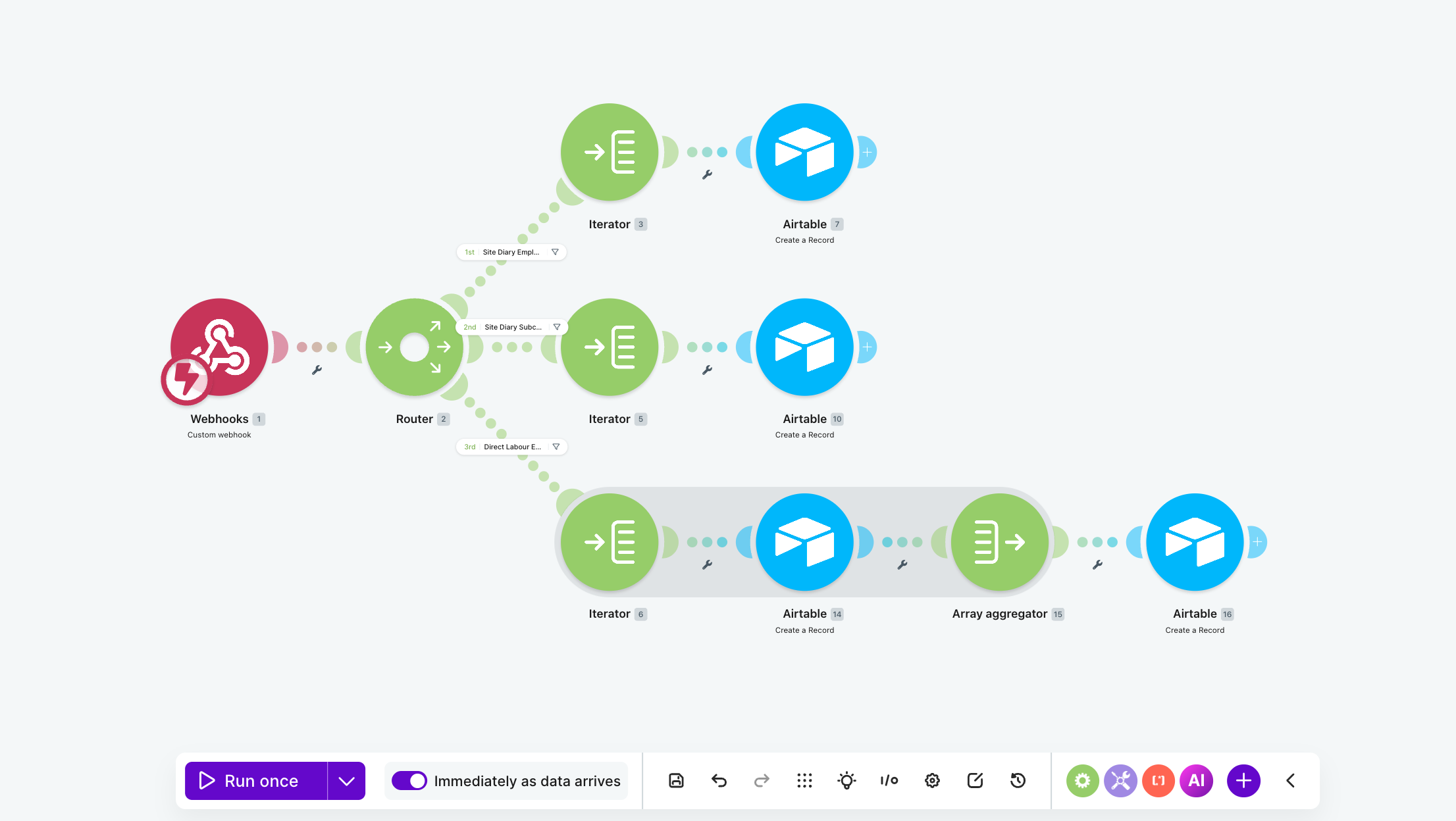
Make.com automation workflow for Atlas Scaffolding hours capture showing Appenate webhook, three-way router for site diary employees, subcontractors and direct labour entries, with iterators and Airtable create-record steps

Make.com scenario - Appenate webhook into a router, with iterators and Airtable writes for each entry type

The Results

Before and after.

Before

A full day of manual data entry every week

just to get payroll ready to start

Subcontractor hours mixed into the master sheet

someone had to manually pull them out

Direct labour hours tallied by hand

billable jobs at risk of going un-invoiced

No built-in checks for allowances

LAHA and travel relied on memory

Manual CSV prep for payroll

re-shaped each week before importing

After

Zero manual data entry

forms push straight into Airtable

Subcontractors auto-separated

routed into a dedicated subcontractor table

Direct labour ready for reconciliation

automatically logged and waiting for sign-off

LAHA & travel flagged automatically

allowance review built into the workflow

Xero-ready CSV out of Airtable

import, run pay - that's the whole job

The Impact

One source of truth across every site,
and a pay run that just runs.

Atlas Scaffolding now has a single point of capture for all hours across every site, feeding into a single source of truth in Airtable. Payroll, invoicing, and subcontractor tracking all run from the same system - with oversight for allowances and direct labour billing built into the process, rather than relying on someone remembering to check. The biggest admin burden this client had is now handled automatically. What used to take a full day each week now takes minutes.