Atlas Scaffolding was manually re-entering every new employee's onboarding form into Xero. We connected Appenate to Xero through Make.com - now the moment a form is submitted, the employee record is created automatically, compliance is checked, and the right people are notified.
Client
Atlas Scaffolding
Industry
Trades & Construction
Tools Used
0
Manual re-entry steps
required
Instant
Xero record created on
form submission
Automatic
QLeave compliance
check on every hire
The Problem
Every time Atlas Scaffolding brought on a new employee, someone had to take the completed onboarding form and manually re-enter all of that information into Xero. For a trades business regularly hiring site workers, this was a repetitive, time-consuming task that pulled admin staff away from more important work.
On top of the wasted time, every manual re-entry was a chance for an error - and QLeave status wasn't being checked consistently, creating a compliance risk on every new hire.
The Solution
We built an automated onboarding workflow triggered the moment a new employee form is submitted in Appenate. Make.com picks up the submission and handles everything from there - no manual steps, no delays, no double-entry.
The automation also checks whether the new employee has a QLeave number. If they don't, an automatic email fires to the admin team flagging that a QLeave account needs to be set up - so nothing falls through the cracks.
What happens automatically
Appenate form submission received
Employee record created in Xero
QLeave number checked automatically
Admin alerted if QLeave action needed
Notifications sent, employee fully onboarded
How It Works
New employee completes their onboarding form in Appenate
On any device, on-site or in the office. The form collects all required employee details.
Make.com triggers instantly on submission
The moment the form is submitted, Make.com picks it up and extracts all the employee data - no delay, no manual trigger required.
New employee record created in Xero
All relevant details are populated automatically in Xero. No copy-paste, no re-entry, no errors from transcription.
QLeave number checked automatically
The automation checks whether the new employee has a QLeave number. If they don't, an automatic email is sent to admin flagging that a QLeave account needs to be created - every single time, without fail.
Notifications and documents sent to the right people
The appropriate team members are notified and relevant documents are distributed to complete the onboarding process.
Under the Hood
The workflow handles success and failure paths separately - Xero record creation, tax detail updates, QLeave checking, and email notifications all branch off the central router.
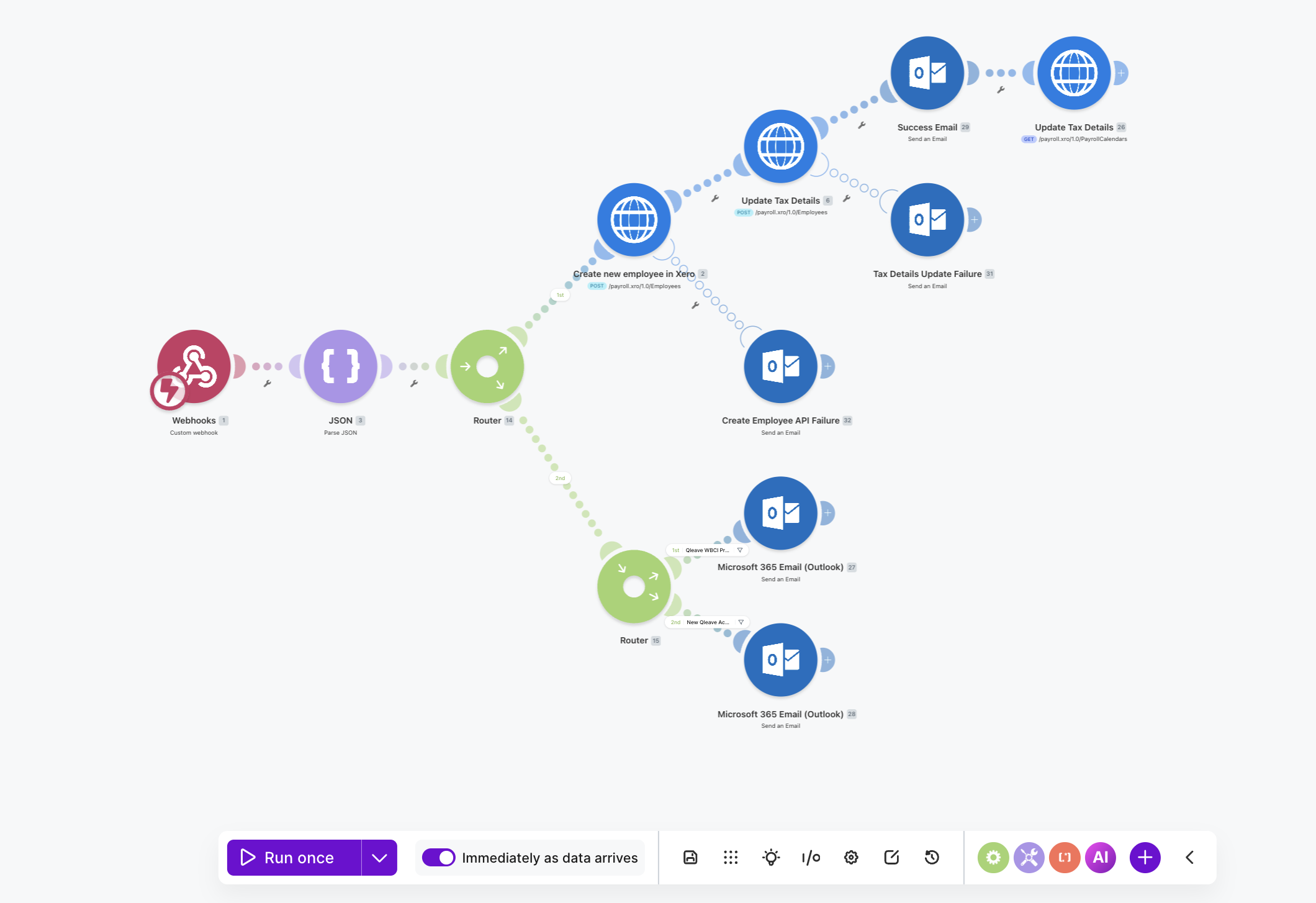
Make.com scenario - Appenate webhook to Xero, with QLeave check and notification branches
The Results
Before
Form filled, then manually entered into Xero
duplicate work on every single hire
Admin time on data re-entry
pulling staff away from higher-value work
Delays between form and system update
records lagged behind reality
QLeave checked manually, or forgotten
compliance risk on every new hire
After
Form submitted, Xero updated instantly
zero re-entry required
Zero admin time on duplicate data entry
staff freed for work that actually matters
Same-moment processing
Xero is accurate from the moment they sign
Automatic QLeave check, every time
instant admin alert if action is needed
The Impact
Atlas Scaffolding now has a hiring process that works the same way every time - whether they bring on one person or ten. New employees are in Xero from the moment their form is submitted, QLeave compliance is checked automatically, and the right people are notified straight away. The paperwork bottleneck is gone.